Why Doesn't ChatGPT Recommend My Business? 9 Reasons (And How to Fix Each One)
Why doesn't ChatGPT recommend my business? 9 common reasons local businesses stay invisible in ChatGPT, with a plain-English fix for each one.
On this page17 sections
- Why Doesn't ChatGPT Recommend My Business? Start With This Test
- The 9 Reasons ChatGPT Isn't Recommending Your Business
- 1. ChatGPT's search crawler is blocked from your site
- 2. Your Google Business Profile is thin
- 3. Your reviews don't say what you do or where
- 4. Your name, address and phone don't match everywhere
- 5. Your website has no schema markup
- 6. Few independent sites mention you
- 7. Your site blocks GPTBot, so future models learn less about you
- 8. Your content is stale
- 9. Your site doesn't show depth on your topic
- Quick Diagnosis: Where to Look First
- What This Means for Your Business
- What Won't Fix It
- FAQ
- Still Asking "Why Doesn't ChatGPT Recommend My Business?" Run Reason #10
- Sources
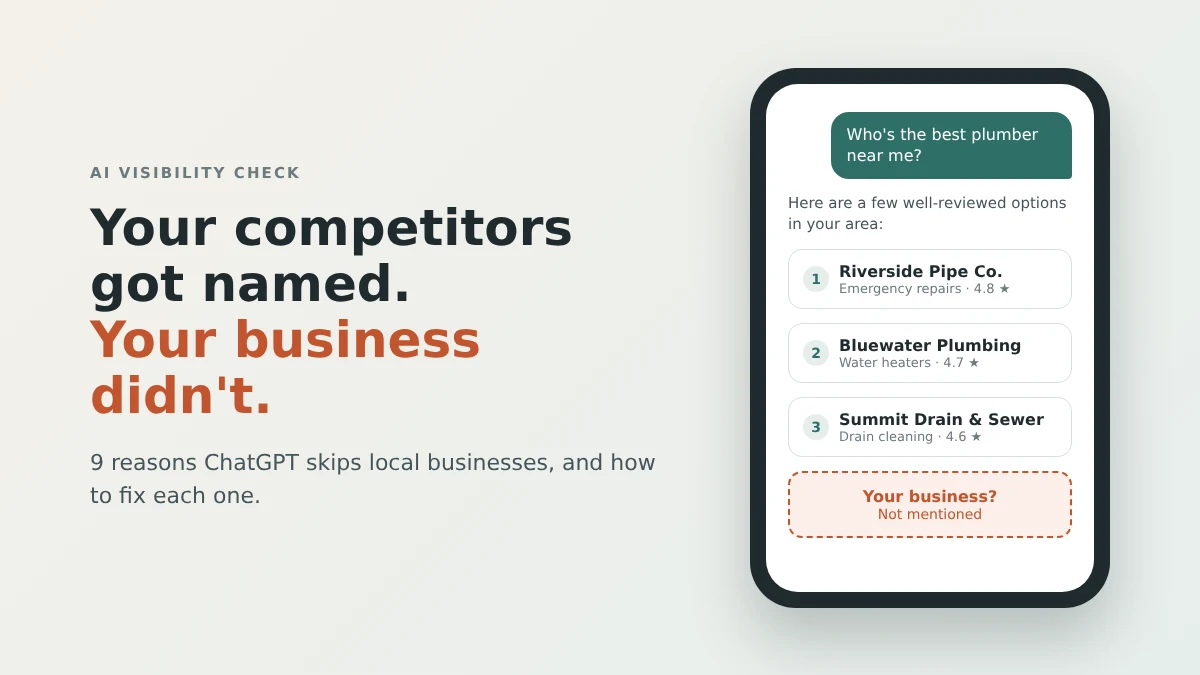
You asked ChatGPT for the best plumber, dentist or lawyer in your town. Your competitor showed up. You didn't. If you're now asking "why doesn't ChatGPT recommend my business?", you're in big company. In SOCi's 2026 Local Visibility Index, which studied roughly 350,000 locations belonging to 2,751 multi-location brands, ChatGPT recommended just 1.2% of them.
Meanwhile, customers are asking. BrightLocal's 2026 Local Consumer Review Survey found that 45% of consumers had used an AI tool to find a local business, up from 6% the year before.
So the demand is real and the bar is high. The good news is that the reasons businesses stay invisible on ChatGPT are usually specific, checkable and fixable. Here are the nine we see most, with a fix for each.
Why Doesn't ChatGPT Recommend My Business? Start With This Test
Before you fix anything, confirm the problem. Open ChatGPT and ask three questions the way a customer would:
- "Who are the best [your service] companies in [your city]?"
- "I need [a specific job] in [your city]. Who should I call?"
- "What is [your business name] in [your city]?"
Ask each question three or four times, in fresh chats. Answers vary between runs, so a single result is an anecdote, not a verdict.
If you never appear, or you appear with the wrong details, ChatGPT can't find your business with enough confidence to name it. That usually comes down to two layers:
- What the model already knows from its training data. This layer changes slowly.
- What it looks up live when someone asks a current, local question. This layer you can influence this month.
Most of the nine reasons below hurt the live layer. A few hurt both. For the full step-by-step process, see our guide on how to get your business recommended by ChatGPT. For how that live lookup works step by step, see How Does ChatGPT Decide Which Businesses to Recommend?.
The 9 Reasons ChatGPT Isn't Recommending Your Business
1. ChatGPT's search crawler is blocked from your site
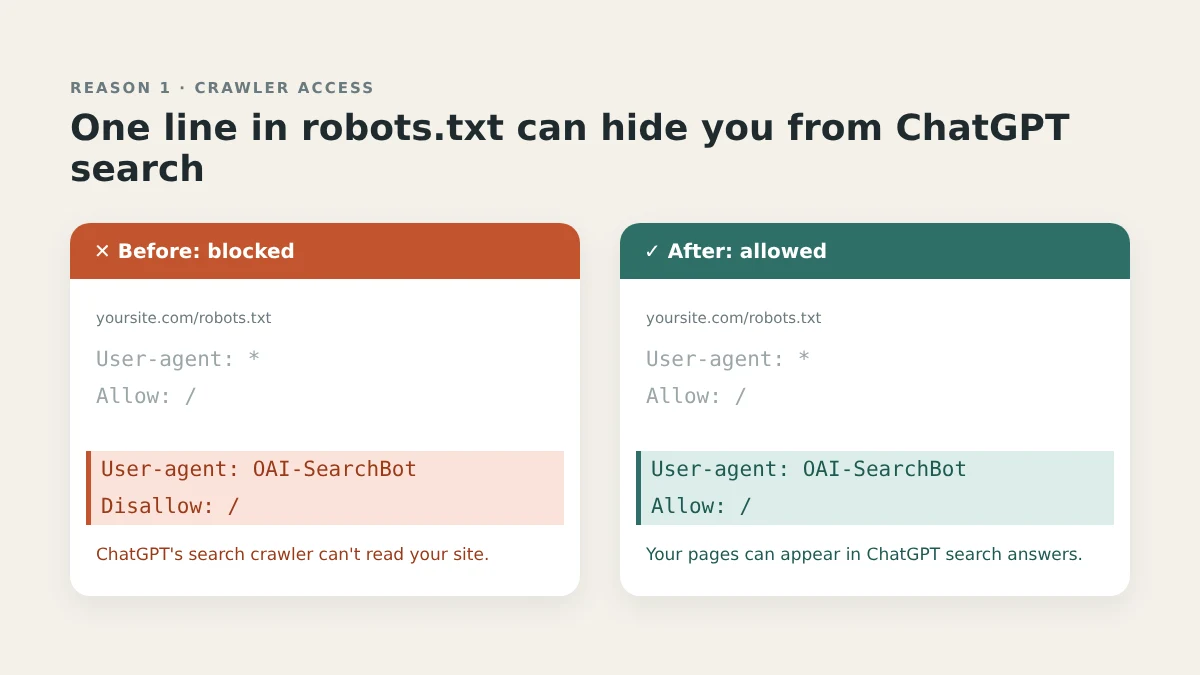
Why it hides you: When ChatGPT searches the web live, it relies on a crawler called OAI-SearchBot. OpenAI's crawler documentation says sites that opt out of OAI-SearchBot won't be shown in ChatGPT search answers. If your site blocks it, you're out before anyone compares you to a competitor.
The block is often invisible to the owner. It can come from an old robots.txt rule, a security plugin, or a hosting or firewall setting that blocks AI crawlers by default.
How to fix it: Open yoursite.com/robots.txt and look for a rule naming "OAI-SearchBot", or a blanket "User-agent: *" followed by "Disallow: /". Remove anything that blocks OAI-SearchBot. Then check your hosting, CDN or firewall dashboard for an "AI bots" or "AI crawlers" setting. OpenAI says robots.txt changes can take about 24 hours to register for search.
2. Your Google Business Profile is thin
Why it hides you: AI assistants lean on structured, trusted sources to answer local questions, and your Google Business Profile is one of the most complete public records of what you do and where. A profile with a category, a phone number and nothing else gives an assistant very little to work with.
How to fix it: Fill in every field that describes your real work: a precise primary category, relevant secondary categories, every service you offer, the exact towns you serve, current hours (including holidays) and real, recent photos. Follow Google's guidelines for representing your business so nothing you add puts the profile at risk.
3. Your reviews don't say what you do or where
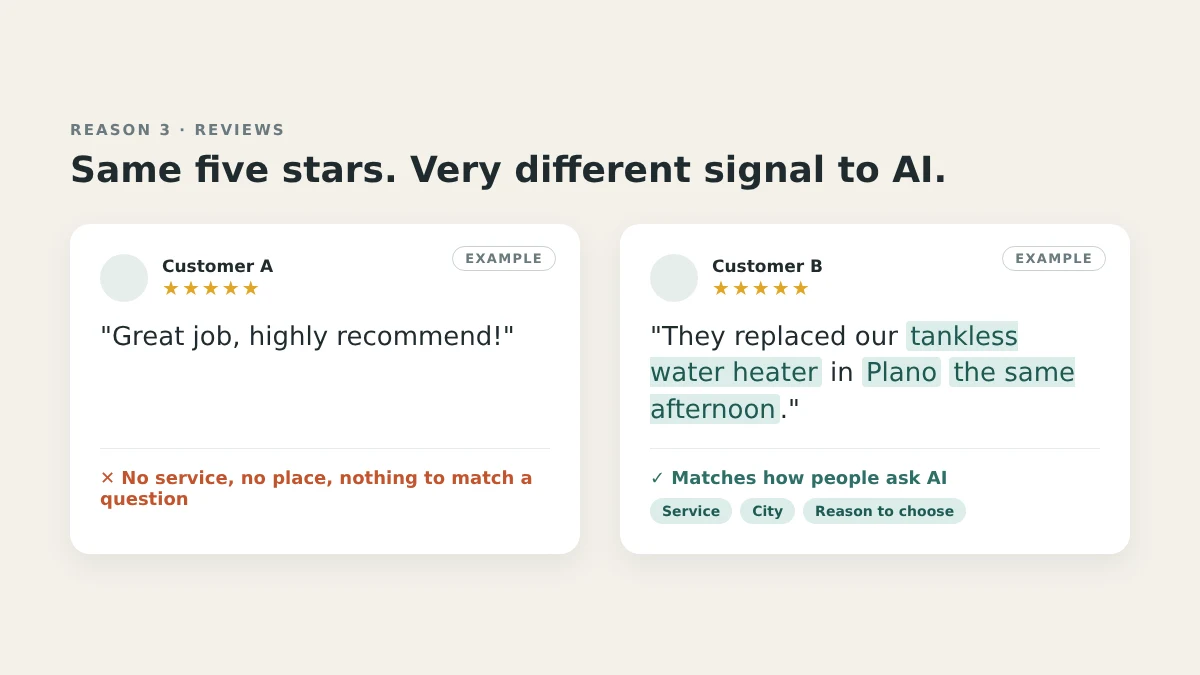
Why it hides you: "Great job, highly recommend!" is a five-star review with almost no information in it. People ask ChatGPT specific questions, like who can fix a tankless water heater in a particular suburb. Reviews that mention the service and the town match those questions. Generic ones don't.
To make it concrete, here is an illustrative example (not a real review): "They replaced our tankless water heater in Plano the same afternoon." That one sentence carries a service, a place and a reason to choose you.
How to fix it: When you ask for a review, ask a better question: "Would you mind mentioning what we fixed and where?" You're not scripting anyone. You're prompting details they'd naturally share. Never buy, fake or pay for reviews. Beyond breaking platform rules, a review profile that doesn't match the rest of your footprint is a weak signal everywhere an AI cross-checks you.
4. Your name, address and phone don't match everywhere
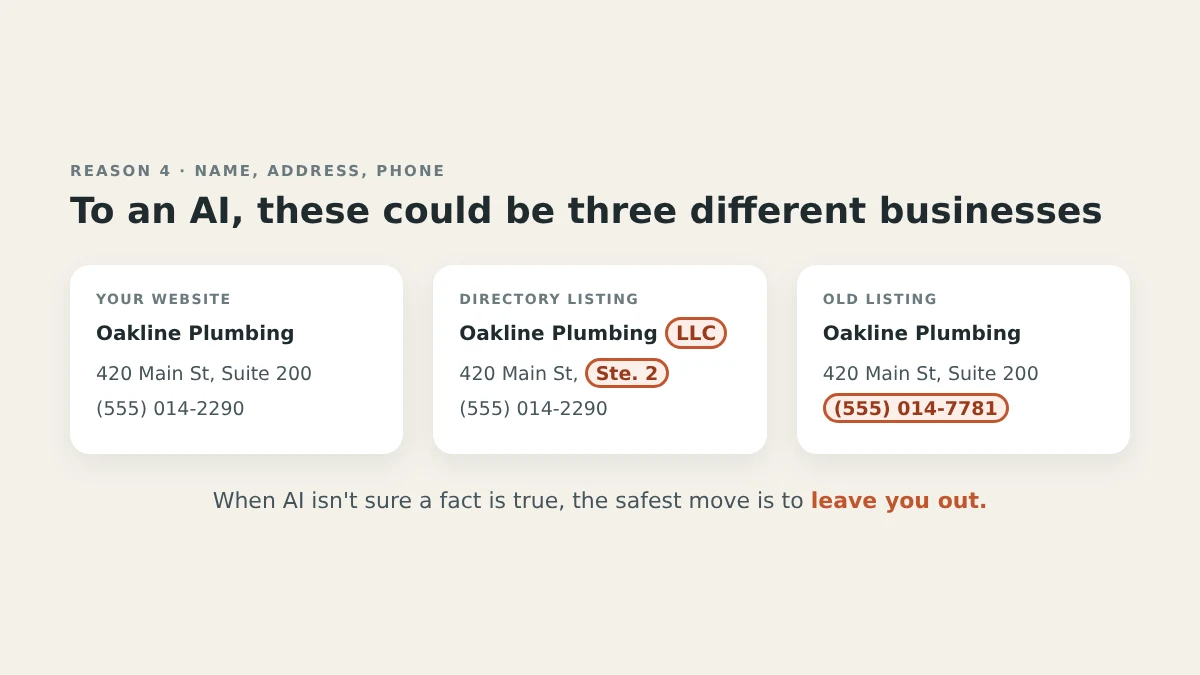
Why it hides you: If your website says "Suite 200", one directory says "Ste. 2" and an old listing still shows a phone number you dropped years ago, an AI system sees three slightly different businesses. When it isn't sure a fact is true, the safest move is to leave you out.
How to fix it: Pick one exact format for your business name, address and phone number (often called NAP). Update it on your website, Google Business Profile, Facebook, Yelp, Bing Places, Apple Business Connect and any industry directories. Then search for your old phone number and old address to find the stragglers.
5. Your website has no schema markup
Why it hides you: Your homepage might say "family plumbing since 1998" in a nice font, but a machine still has to guess what kind of business you are, where you operate and what you offer. Schema markup removes the guessing.
How to fix it: Add LocalBusiness schema to your site, or the more specific type for your trade (schema.org has types such as Plumber and Dentist). Include your name, address, phone, hours, service area and services. Make sure every value matches what's visible on the page and on your Google profile. Most website builders and SEO plugins can add this without code.
6. Few independent sites mention you
Why it hides you: An assistant deciding whether to name you looks for confirmation from someone other than you. If the only place describing your business is your own website, you're a weaker recommendation than a competitor that's also listed by a trade association, a supplier and the local paper.
How to fix it: Focus on mentions a real customer might actually see:
- Trade associations and licensing bodies you already belong to
- Manufacturer or supplier "find an installer" pages you qualify for
- Local news, chamber of commerce and community sites
- The two or three directories customers in your industry really use
Skip link farms and paid "placement" networks. If a page exists only for search engines, it won't help you here.
7. Your site blocks GPTBot, so future models learn less about you
Why it hides you: GPTBot is a different crawler from OAI-SearchBot. According to OpenAI, GPTBot collects content that may be used to train future models, and blocking it signals that you don't want your content used that way. Blocking GPTBot doesn't remove you from ChatGPT search. But the "what the model already knows" layer is built from training data, and a site that has always blocked GPTBot contributes less to that picture over time.
How to fix it: This one is a genuine choice, not a mistake. Some businesses block training crawlers on purpose, and that's a legitimate decision. If you'd rather future models know you well, allow GPTBot in your robots.txt. If you'd rather not, keep the block and put more effort into reasons 1–6, which affect the live layer.
8. Your content is stale
Why it hides you: An old service list, a "latest news" post from years ago and outdated hours all suggest your information may not be reliable. When ChatGPT searches live, it favors pages that clearly answer the question as it stands today.
How to fix it: Review your core pages every quarter: services, service areas, hours, team, and any price ranges you're comfortable publishing. Add one genuinely useful page each month, such as an answer to a question customers ask on every call. Show a visible "last updated" date on pages where timing matters.
9. Your site doesn't show depth on your topic
Why it hides you: If your site has a homepage, a contact page and one "Services" page listing twelve things, there's little evidence you're an authority on any of them. A competitor with a clear page for each main service, explaining what it involves, how long it takes and what can go wrong, simply gives ChatGPT more to quote.
How to fix it: Build one page per core service, written in plain language. Answer the questions customers really ask, such as cost factors, timelines and common problems, and add a short FAQ section with FAQ schema to each page. Link those pages to each other so your site reads as one connected body of expertise. Our guide to generative engine optimization explains why this kind of quotable, structured content matters across every AI assistant.
Quick Diagnosis: Where to Look First
| # | Reason | How to check | Typical effort |
|---|---|---|---|
| 1 | Search crawler blocked | yoursite.com/robots.txt, plus hosting/firewall settings | Minutes |
| 2 | Thin Google Business Profile | Look for empty fields in your profile | An afternoon |
| 3 | Vague reviews | Read your most recent reviews | Ongoing |
| 4 | Inconsistent NAP | Search your name, old phone and old address | A week or two |
| 5 | No schema | Run your homepage through a schema validator | Hours to days |
| 6 | Few independent mentions | Search your business name, excluding your own site | Ongoing |
| 7 | GPTBot blocked | yoursite.com/robots.txt | Minutes, if you choose to change it |
| 8 | Stale content | Check "last updated" dates on core pages | Quarterly |
| 9 | Thin topic depth | Count your individual service pages | Weeks |
What This Means for Your Business
The nine reasons apply to everyone, but some matter more depending on what you do.
- Plumbers, HVAC companies and electricians: Many AI questions are urgent, like an emergency repair tonight. Reasons 1, 2 and 4 matter most: a crawlable site, accurate hours and service areas, and one consistent phone number.
- Dentists and med spas: Patients ask about specific treatments. Focus on reasons 3 and 9: reviews that name treatments, and one clear page per treatment.
- Law firms: People ask about practice areas in a specific city. Focus on reasons 6 and 9: legal directory profiles and practice-area pages that answer real questions. Never fake or incentivize reviews; in a profession with its own advertising rules, the cost can go far beyond visibility.
- Marketing agencies: When a client asks why ChatGPT is not recommending their company, these nine reasons double as a checklist for your first audit.
What Won't Fix It
- Paying for "ChatGPT submission." There is no such mechanism for organic recommendations.
- Anyone guaranteeing a recommendation by a certain date. Nobody controls what ChatGPT says, and its answers vary from one run to the next.
- An llms.txt file on its own. It can be a tidy summary of your site, but it doesn't control AI rankings.
- Mass-produced AI articles. Volume without substance is the opposite of what assistants look for.
FAQ
Why is ChatGPT recommending my competitor and not me?
Usually because your competitor's public footprint answers the question more clearly: a crawlable site, a complete profile, specific reviews, consistent details and independent mentions. Work through reasons 1–6 first.
How long does it take to fix ChatGPT visibility?
It depends on the fix. OpenAI says a robots.txt change can register for search in about 24 hours. Reviews and independent mentions build over weeks to months. Re-test monthly and watch for trends rather than single answers.
My business is not showing in ChatGPT at all. Where do I start?
Start with reason 1. If OAI-SearchBot can't reach your site, nothing else on this list can help ChatGPT's live search find you. Then check your Google Business Profile and your NAP consistency.
Can I contact OpenAI to get my business added?
No. There is no submission form for business recommendations. You influence the answer by improving the public information ChatGPT draws from.
Still Asking "Why Doesn't ChatGPT Recommend My Business?" Run Reason #10
Reason #10 is the simplest: you haven't checked yet. Alrebro's free AI visibility scan takes about 60 seconds, needs no signup or credit card, and shows which of these nine problems apply to your site. Run your free scan and swap the guessing for a fix list you can start on today.
Sources
- BrightLocal, "Local Consumer Review Survey 2026: AI trust analysis": https://www.brightlocal.com/research/lcrs-ai-trust/
- SOCi, "2026 Local Visibility Index": https://www.soci.ai/insights/lvi/
- OpenAI, "Overview of OpenAI Crawlers": https://developers.openai.com/api/docs/bots
- Google Business Profile Help, "Guidelines for representing your business on Google": https://support.google.com/business/answer/3038177
Founder, Alrebro
Fazal Ur Rehman is the founder of Alrebro and an AI SEO strategist focused on search visibility, technical SEO, and digital growth. He shares practical insights, industry trends, and actionable strategies to help businesses succeed online.
More from Fazal Ur RehmanRelated articles
How to Appear in Google AI Overviews and Gemini: What Actually Works in 2026
How to rank in Google AI Overviews and Gemini in 2026: what Google actually says, which local searches trigger them, and what works for small businesses.
How to Rank in Perplexity AI in 2026: A Practical Guide for Small Businesses
How to rank in Perplexity in 2026: how it picks and cites sources, and a 7-step plan small businesses can use to show up in Perplexity answers.
The Complete List of AI Crawlers (and Whether to Block or Allow Each One)
Every AI crawler that visits your site does one of three jobs. Here's what each one is — and whether blocking it is a privacy decision or a visibility mistake.
Get new articles in your inbox
No spam — just SEO strategy and updates, occasionally.
This site is protected by reCAPTCHA and the Google Privacy Policy and Terms of Service apply.
Find out what's actually wrong
39 checks, your off-page signals, and a plan you can act on. Free, about a minute, no account needed.