How to Appear in Google AI Overviews and Gemini: What Actually Works in 2026
How to rank in Google AI Overviews and Gemini in 2026: what Google actually says, which local searches trigger them, and what works for small businesses.
On this page17 sections
- What Google Says About How to Rank in Google AI Overviews
- When Do AI Overviews Show Up for Local Searches?
- Where Gemini Fits In
- How to Rank in Google AI Overviews: 7 Steps That Work
- Step 1: Make sure Google can crawl and index you
- Step 2: Complete your Google Business Profile
- Step 3: Answer the informational questions in your trade
- Step 4: Cover the related sub-questions
- Step 5: Use structured data that matches your page
- Step 6: Keep text, images and video working together
- Step 7: Track it in Search Console
- A Simple Page Template for Informational Questions
- Myths About Google AI Overviews Optimization
- What This Means for Your Business
- FAQ
- The Short Answer on How to Rank in Google AI Overviews
- Sources
Search for almost anything on Google today and there's a good chance an AI-written summary sits above the blue links. For local businesses, that summary is now part of the shop window. If you're trying to work out how to rank in Google AI Overviews, here's the reassuring part: Google has said, in writing, that there's no secret trick.
This guide covers what Google actually says, which local searches trigger AI Overviews (and which don't), how Gemini fits in, and the practical steps that make your business easier to include. It also covers the myths you can stop paying for.
What Google Says About How to Rank in Google AI Overviews
Google's Search Central documentation on AI features and your website is unusually direct. To appear as a supporting link in AI Overviews or AI Mode, a page must be "indexed and eligible to be shown in Google Search with a snippet." Then the key line:
"There are no additional requirements to appear in AI Overviews or AI Mode, nor other special optimizations necessary."
Google also says there's no special schema.org structured data you need to add, and no new machine-readable or AI text files required. And it adds a caveat worth remembering: even if you meet every requirement, inclusion "isn't guaranteed."
Two other details from the same page matter:
- Query fan-out. AI Overviews and AI Mode may run "multiple related searches across subtopics and data sources" to build one answer. A single question can pull in pages that rank for related sub-questions, not just the exact search.
- Overviews don't always appear. Google shows them only when its systems judge them "additive to classic Search."
So Google AI Overviews optimization is mostly classic SEO done properly. That's good news: there's nothing exotic to buy. For the wider picture across every AI assistant, see our guide to generative engine optimization.
When Do AI Overviews Show Up for Local Searches?
Whitespark ran 540 US searches across three cities (Houston, Phoenix and Denver) and six industries, including plumbers, dentists and personal injury lawyers (Whitespark, May 2025). AI Overviews appeared on 68% of those searches on average. But the split by intent is the useful part:
| Search intent | Example | AI Overview shown | Local pack shown |
|---|---|---|---|
| Local | "plumber near me" | 15% | 93% |
| Informational | "why is my water heater leaking" | 92% | 6% |
| Hybrid | "best way to fix a leaking water heater in Phoenix" | 97% | 17% |
Example searches are illustrative; percentages are Whitespark's.
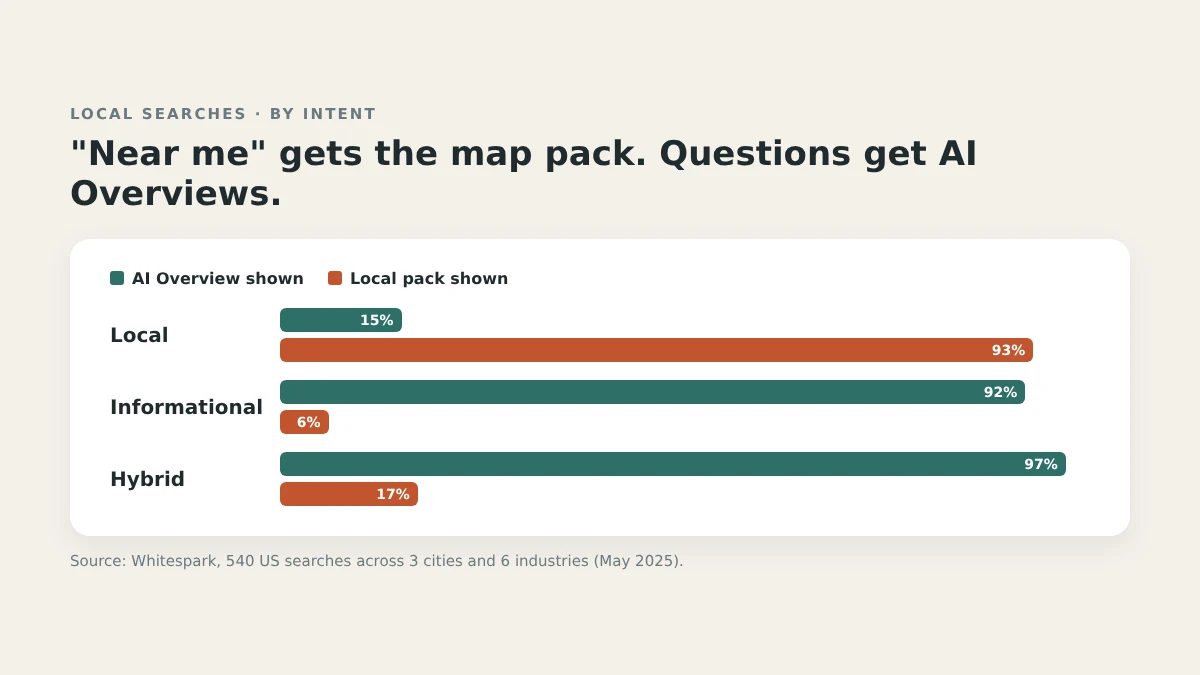
The pattern is clear. When someone wants a business right now, Google still mostly shows the map pack. When someone wants to understand a problem, Google mostly shows an AI Overview. The study is small, and Whitespark itself notes that a clearer pattern might emerge from many thousands of queries, but the direction is consistent.
What that means for you: AI Overviews for local business are mostly won with helpful content, while "near me" searches are still mostly won with your Google Business Profile. You need both.
Where Gemini Fits In
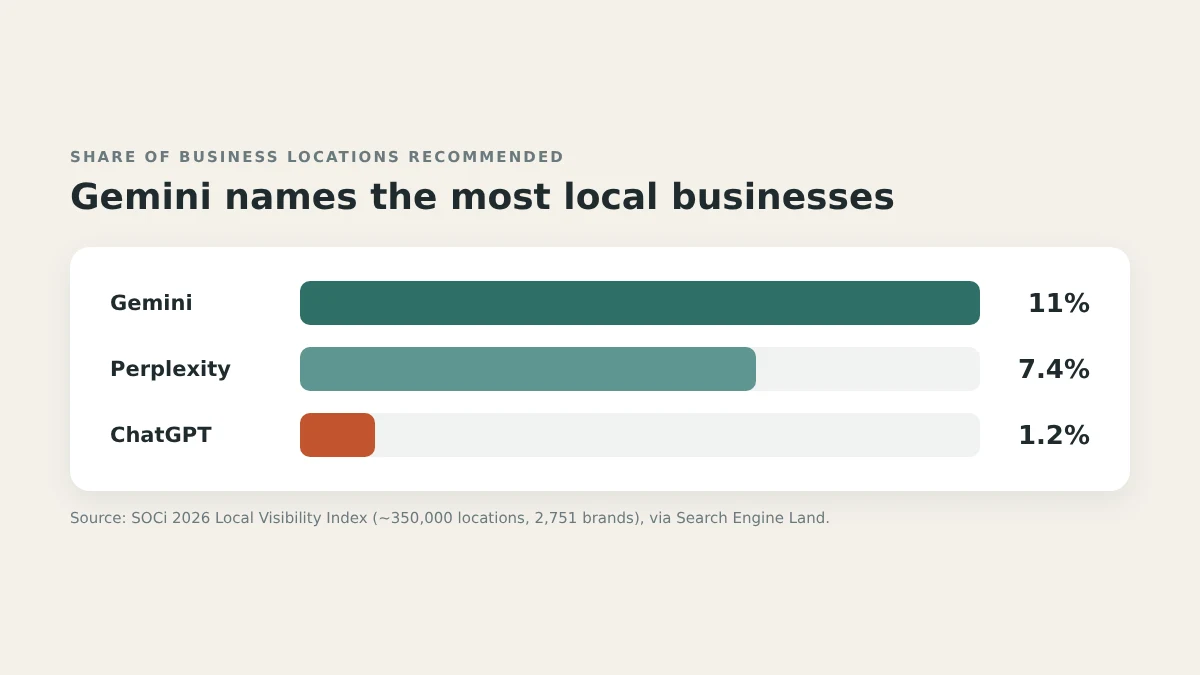
Gemini is Google's own AI assistant, built alongside Google Search and Maps. In SOCi's 2026 Local Visibility Index of roughly 350,000 locations, Gemini recommended 11% of locations, compared with 7.4% for Perplexity and 1.2% for ChatGPT (Search Engine Land). The same research found business information on ChatGPT and Perplexity was only about 68% accurate.
Google's AI Mode matters too. BrightLocal found 23% of consumers had used Google's AI Mode for a business recommendation in the past year (BrightLocal).
The takeaway: if you want to appear in Gemini answers, your Google Business Profile isn't a side task. It's the main input. Google's own guidance for AI features also tells businesses to keep Business Profile information up to date.
How to Rank in Google AI Overviews: 7 Steps That Work
Step 1: Make sure Google can crawl and index you
Every AI Overview link starts as an indexed page. Verify your site in Google Search Console, check that your key pages are indexed, and make sure robots.txt and your hosting or CDN settings don't block Googlebot. If a page has a nosnippet tag on it, it can't be shown as a snippet, which means it can't be an AI Overview link either.
Step 2: Complete your Google Business Profile
This is the step that feeds Gemini business recommendations and the local pack at the same time. Fill in a precise primary category, secondary categories, every service, the towns you serve, accurate hours (including holidays) and real photos. Keep it current. Google's guidance specifically mentions keeping Business Profile information up to date.
Step 3: Answer the informational questions in your trade
Whitespark's data shows informational searches trigger AI Overviews over 90% of the time. These are the searches you can win with content:
- "Why is my AC blowing warm air?"
- "How long does a dental crown last?"
- "What happens at a first meeting with a personal injury lawyer?"
Pick the 10–20 questions customers ask you most, and give each a clear page or section. Open with a direct two- or three-sentence answer, then explain. Write for the customer, not for a keyword tool. Google calls this "people-first" content.
Step 4: Cover the related sub-questions
Because of query fan-out, Google may pull answers from several related searches into one Overview. A page about "furnace not turning on" is more useful, and more likely to be pulled in, if it also covers the natural follow-ups: thermostat checks, pilot light issues, when to call a pro and typical repair costs. Link related pages to each other so Google can find the whole set.
Step 5: Use structured data that matches your page
Google says there's no special schema for AI features. But standard structured data still helps Google understand your business, as long as it matches what's visible on the page. Add LocalBusiness schema (or your specific type) with your name, address, phone, hours and service area, and FAQ schema where you have real FAQs.
Step 6: Keep text, images and video working together
Google recommends keeping important content in text form and supporting it with relevant images and video. A photo of the actual part you replaced, or a short video explaining a common fix, makes the page more useful to people, which is what Google's systems are built to reward.
Step 7: Track it in Search Console
Google says traffic from AI Overviews and AI Mode is included in the Performance report in Search Console, under the "Web" search type. It isn't broken out separately, so watch your informational pages: rising impressions on question-style searches usually means your content is being surfaced. Google also says clicks from AI Overview pages tend to be higher quality, with people spending more time on the site. So a page with fewer clicks than last year can still be bringing in better-fit customers; judge it by calls and form fills, not clicks alone.
A Simple Page Template for Informational Questions
Most small businesses don't need a content strategy document. They need a repeatable page shape. This one works for nearly any "why / how / how long / how much" question in your trade:
- The question as the heading. Use the customer's own words: "Why is my AC blowing warm air?"
- A direct answer in two or three sentences. The most likely causes, in plain language, right at the top. This is the part most likely to be summarized.
- The detail, in short sections. One H3 per cause or step, each a few sentences long, so each can stand on its own.
- What a homeowner can safely check. Simple, safe steps, plus a clear line on when to stop and call a pro.
- Cost and time factors. What affects the price and how long a fix usually takes. Publish real ranges only if you're comfortable standing behind them.
- A real photo or short video. Your own work, not stock images.
- Two or three related questions. Link to your pages on the natural follow-ups. This is how you cover the query fan-out from Step 4.
- Who wrote it. A named person with their role or license, so readers know a real professional is behind the advice.
Ten pages built this way, each answering a question your customers actually ask, will do more for AI Overviews for local business than a hundred thin blog posts. Start with the questions you answer on the phone every week.
A quick test before publishing: read only the first three sentences under each heading. If those sentences answer the heading on their own, the page is easy for Google to summarize and easy for a busy customer to scan.
Myths About Google AI Overviews Optimization
- "You need special AI schema." Google says there's no special schema.org structured data required for AI features.
- "You need an llms.txt file to appear in AI Overviews." Google says no new machine-readable or AI text files are needed. An llms.txt file doesn't control AI rankings.
- "Someone can guarantee you an AI Overview spot." Google says inclusion isn't guaranteed, even if you meet every requirement. Anyone promising otherwise is guessing.
- "AI Overviews replace local SEO." For "near me" searches, the local pack still dominates. Your Google Business Profile matters more than ever, not less.
What This Means for Your Business
- Plumbers, HVAC and electricians: Write the "why is my X doing Y" pages. Those informational searches are exactly where AI Overviews appear most.
- Dentists and med spas: Treatment explainers (what it is, how long it lasts, recovery, cost factors), written plainly and within your professional rules.
- Law firms: Process pages ("what happens after a car accident claim is filed") are informational searches that often trigger Overviews.
- Agencies: Use the intent split above to explain to clients why they need both GBP work and content work, and track informational pages in Search Console. A simple monthly report showing impressions on question-style searches is often the clearest way to show progress.
For Perplexity, which cites sources differently, see how to rank in Perplexity. If ChatGPT is the problem, start with Why Doesn't ChatGPT Recommend My Business?
FAQ
Do I need special optimization to appear in Google AI Overviews?
No. Google says there are no additional requirements or special optimizations. Your page must be indexed and eligible to show with a snippet, and good SEO fundamentals do the rest.
Can I appear in Gemini answers without a Google Business Profile?
It's much harder. Gemini is Google's own assistant, and Google's guidance for AI features specifically tells businesses to keep their Business Profile information current. Treat your profile as the main input.
Can I see AI Overview traffic in Search Console?
Yes, but it's not separated out. Google includes AI Overview and AI Mode traffic in the Performance report under the "Web" search type.
Is Google AI Mode the same as AI Overviews?
They're related but different. AI Overviews appear inside regular search results, while AI Mode is a more conversational search experience. Google's guidance for site owners covers both together: the same eligibility rules and best practices apply, and both count toward your Search Console traffic.
How do I stop Google from using my content in AI Overviews?
Google's preview controls, such as nosnippet, data-nosnippet and max-snippet, limit what can be shown from your pages in Search, including AI features. Using them also limits your regular search snippets, so most businesses shouldn't.
The Short Answer on How to Rank in Google AI Overviews
How to rank in Google AI Overviews comes down to being indexable, being genuinely helpful on the questions your customers ask, and keeping your Google Business Profile complete. Find out which of those you've already got covered: Alrebro's free AI visibility scan takes about 60 seconds, needs no signup or credit card, and shows you what to fix first. Run your free scan.
Sources
- Google Search Central, "AI features and your website": https://developers.google.com/search/docs/appearance/ai-features
- Whitespark, "Case Study: The Prevalence of AI Overviews in Local Search" (May 2025): https://whitespark.ca/blog/case-study-the-prevalence-of-ai-overviews-in-local-search/
- Search Engine Land, reporting SOCi's 2026 Local Visibility Index (January 28, 2026): https://searchengineland.com/ai-local-visibility-report-2026-468085
- BrightLocal, "Local Consumer Review Survey 2026: AI trust analysis": https://www.brightlocal.com/research/lcrs-ai-trust/
Founder, Alrebro
Fazal Ur Rehman is the founder of Alrebro and an AI SEO strategist focused on search visibility, technical SEO, and digital growth. He shares practical insights, industry trends, and actionable strategies to help businesses succeed online.
More from Fazal Ur RehmanRelated articles
How to Rank in Perplexity AI in 2026: A Practical Guide for Small Businesses
How to rank in Perplexity in 2026: how it picks and cites sources, and a 7-step plan small businesses can use to show up in Perplexity answers.
Why Doesn't ChatGPT Recommend My Business? 9 Reasons (And How to Fix Each One)
Why doesn't ChatGPT recommend my business? 9 common reasons local businesses stay invisible in ChatGPT, with a plain-English fix for each one.
The Complete List of AI Crawlers (and Whether to Block or Allow Each One)
Every AI crawler that visits your site does one of three jobs. Here's what each one is — and whether blocking it is a privacy decision or a visibility mistake.
Get new articles in your inbox
No spam — just SEO strategy and updates, occasionally.
This site is protected by reCAPTCHA and the Google Privacy Policy and Terms of Service apply.
Find out what's actually wrong
39 checks, your off-page signals, and a plan you can act on. Free, about a minute, no account needed.